


Quick Answer
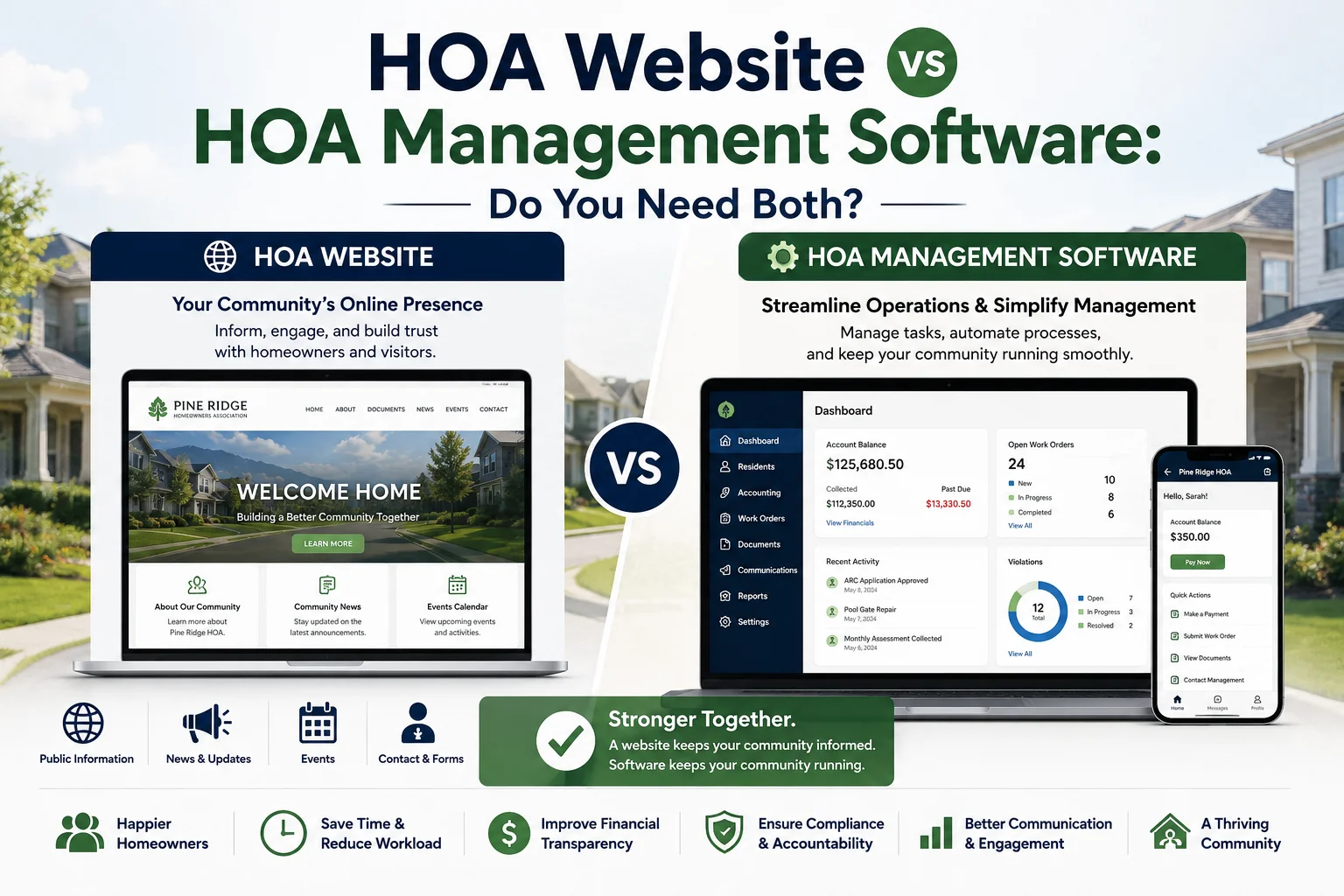
An HOA website builder gives your community a public home page, a document library, and a private owner login. HOA software runs the association itself: dues billing, accounting, violations, architectural requests, and voting. A website builder is often enough for a small volunteer board that only needs to share information. Once your board collects dues online, enforces CC&Rs, or has to post financial records, you will want HOA software, ideally with the website built in so documents and owner data stay in one place. In Florida, HOAs with 100 or more parcels must post specific records on a website or app with an owners-only section.
Boards shopping for an HOA website builder or HOA website software quickly run into a confusing market. Some products are website builders with a few management features added. Others are full HOA platforms that include a website. Still others sell the website as a separate product from dues collection and accounting. The labels overlap, so it is easy to buy the wrong tool or pay for two tools that do the same job.
This guide explains what each category does, what Florida law requires, what an HOA website typically costs, and which setup fits your community. It closes with a page-by-page template you can use whichever tool you choose.
What Is an HOA Website Builder?
An HOA website builder is a tool for creating and hosting your community’s website without hiring a developer. Most use templates designed for associations, so a volunteer can publish pages, upload documents, and post announcements in an afternoon.
A typical HOA website builder includes:
• A public homepage for announcements and community news
• A document library for governing documents, minutes, and forms
• A community calendar for meetings and events
• Board and committee contact pages
• A private login area for owners
• Email or text blasts to residents
• Online payment links, often through a third-party processor
What a website builder usually does not include is the operational backend: owner ledgers tied to assessments, a general ledger, reserve fund tracking, violation and architectural review workflows, or board reporting. Payments collected through a website builder often land in a processor account that someone still has to reconcile by hand.
HOA Express isa well-known example of a standalone builder. Its published pricing includes a free plan for communities with up to 50 households, plus paid Inform and Engage plans at $15 and $21 per month (billed yearly) for communities with up to 25households, with prices rising by household count. The feature list centers on websites, communication, forms, and payments rather than association accounting(Source: HOA Express pricing page, accessed September 25, 2026).
What Does HOA Software Do?
HOA software is the system that runs the business side of a community association. It connects owner accounts, money, and records so the board is not stitching together spreadsheets, email, and a payment processor. Core functions include:
• Assessment billing, online dues collection, and autopay tied to each owner’s ledger
• Fund accounting, budgets, bank reconciliation, and reserve tracking
• Violation tracking with notice templates and hearing records
• Architectural review requests from submission to approval
• Maintenance and work order tracking
• Online elections, surveys, and board voting
• An owner portal for payments, requests, and documents
• Board-ready financial and operational reports
Most HOA software includes an owner portal, which is a logged-in space for owners. Fewer include a public-facing website that prospective buyers, realtors, and visitors can see. That gap is where the confusion starts: a portal and a website look similar but serve different audiences.
For a deeper look at the category, see Community Association Software: What It Does and How to Choose.
Does Your HOA Legally Need a Website?
For most communities, a website is a best practice rather than a legal requirement. Florida is the major exception, and its rules are a useful benchmark for what a compliant association website should do anywhere.
Florida HOAs with 100 or more parcels
Under Florida Statute 720.303(4)(b), an HOA with 100 or more parcels had to post specified official records on its website or a mobile app by January 1, 2025. The required postings include:
• Articles of incorporation, recorded bylaws, the declaration of covenants, and every amendment
• The current rules of the association
• A list of current executory contracts and, after bidding closes, bids received in the past year
• The annual budget, any proposed budget, and the annual financial report
• Current insurance policies
• Each director’s education certification
• Contracts involving directors or officers, and any conflict of interest documents
• Member meeting notices and agendas at least 14 days in advance, plus board meeting notices within the standard notice period
The statute also sets rules for how the site works:
• The website or app must include a protected section that the general public cannot access, open only to parcel owners and association employees.
• The association must give any owner who asks in writing a username and password for that protected section.
• Member meeting notices must appear on the homepage or on a clearly linked page labeled "Notices."
• Documents the members will vote on must be posted at least 7 days before the meeting.
• Protected information, such as Social Security numbers, phone numbers, and email addresses, must be redacted before documents are posted.
Source: Florida Statutes, Chapter 720, Section 720.303(4)(b), 2026 edition, Florida Legislature (Online Sunshine).
Florida condominium associations
Condominium associations with 25 or more units face a similar requirement under Florida Statute 718.111(12)(g), which applies from January 1, 2026. Our Florida HOA Laws 2026 guide covers both mandates alongside the other HB 1203 changes.
Outside Florida
Other states set their own records-access rules, and your governing documents may require more than state law does. Check both before deciding that a basic website is enough.
Why this matters for your tool choice
A standalone website builder can satisfy a posting requirement, but someone has to export budgets, financial reports, and notices from another system and upload them on schedule. When the website, owner accounts, and accounting live in one platform, the board posts from the same place it works, and owner logins come from the same owner records.
Posting records for a Florida association?
ManageCasa gives owners password-protected access to shared documents such as bylaws, meeting minutes, and financials, and the HOA Website add-on gives your community a public site connected to the same owner records. See how boards organize required postings in a live demo.
Schedule a Demo
Website Builder, HOA Software, or Both?
The right answer depends on what your association struggles with today and how it is run.
Still deciding how your community should be run? See HOA Self-Management vs. Property Management. If a management company runs your community, ask how it handles the website before assuming it is covered; HOA Management Company: What They Do and How to Choose One lists the questions to ask.
How Much Does an HOA Website Cost?
HOA website pricing follows three common models:
• Free or low-cost builders. Entry plans can start at no cost for small communities, with paid tiers that scale by household count, as in the HOA Express example above.
• Custom or vendor-managed sites. Some vendors design and maintain the site for you and quote pricing per community rather than publishing it. Ask for the full annual cost, any setup fee, and what happens to your content if you leave.
• A website included with, or added to, HOA software. Some platforms include a website on higher plans and sell it as an add-on on lower ones. Others offer an owner portal but no public website at all.
The price of the website alone is rarely the right comparison. Add the cost of your payment processor, accounting tool, and email tool, plus the volunteer hours spent moving data between them. A website that costs more but replaces two other subscriptions can be the cheaper option.
What to Look for in an HOA Website Builder
Content and design
• Templates designed for associations, so pages look professional without a designer
• Easy editing for non-technical volunteers
• Mobile-friendly layouts, since many owners check the site on their phones
• Custom domain support (for example, yourcommunityhoa.org) and professional email
Hosting and security
Most HOA website software includes hosting in the subscription, so the questions to ask are about reliability and access control:
• HTTPS on every page, automatic backups, and a published uptime record
• A true owners-only section with individual logins, not one shared password
• Role-based access so board-only documents stay private
Compliance features
• A clearly labeled Notices page linked from the homepage
• Separate public and owners-only document folders
• Date-stamped uploads so you can show when a record was posted
Integration
• Payments that post to owner accounts automatically, not just a link to a processor
• Owner lists that stay in sync with your accounting records
• Data export, so you can take documents and owner data with you if you switch
Comparing full platforms for a board that runs the community itself? See Best Self-Managed HOA Software.
HOA Website Template: Pages Every Community Site Needs
Whatever tool you choose, most association websites work best with the same core pages:
Frequently Asked Questions
What is the best HOA website builder?
The best choice depends on what your board needs the site to do. For sharing documents and announcements, a template-based builder with an owners-only section is usually enough. If your board also collects dues, tracks violations, or must post financial records, a platform that combines the website with accounting and an owner portal avoids exporting data between systems.
How much does an HOA website cost?
Costs range from free plans for small communities to monthly subscriptions that scale with the number of homes, plus custom sites priced by quote. Compare total cost, including payment processing and accounting tools, not just the website fee.
Is an owner portal the same as an HOA website?
No. An owner portal is a logged-in space where owners pay dues, submit requests, and view their account. A website is the public face of the community for residents, buyers, and visitors. Many communities use both, with the public site linking to the portal.
Does Florida require HOAs to have a website?
Yes, for larger associations. Florida Statute 720.303(4)(b) required HOAs with 100 or more parcels to post specified official records on a website or mobile app by January 1, 2025, including a protected section open only to parcel owners and association employees. Condominium associations with 25 or more units have a similar requirement under Florida Statute 718.111(12)(g).
Can we build our own HOA website on a general website builder?
Yes, but general builders are not designed for associations. You would need to set up owner logins, document permissions, and payments yourself, and keep the site updated as board members change. HOA-specific builders include those pieces by default.
What should go behind the owner login?
Financial reports, budgets, insurance policies, contracts, owner directories, and anything containing personal information. Keep announcements, the calendar, board contacts, and general community information public.
Related HOA Guides
• Florida HOA Laws 2026: What Homeowners and Board Members Need to Know
• Community Association Software: What It Does and How to Choose
• Best Self-Managed HOA Software
• HOA Self-Management vs. Property Management: Key Pros and Cons
• HOA Management Company: What They Do and How to Choose One
• Best Payment Software for Property Management
Your HOA Website and Everything Behind It, on One Platform
ManageCasa runs dues collection, fund accounting, violations, architectural reviews, eVoting, and owner portals in one place. The HOA Website is available as an add-on on the Base and Growth plans and is included with the Premium plan, so your public site uses the same owner records, documents, and payments your board already manages. Plans start at $45 per month, billed yearly.
Schedule a Demo / Compare Plans

Content Writer
Dann is a real estate and property management content strategist specializing in HOA operations, financial management, and community governance. He works closely with industry professionals to produce accurate, practical guidance for property managers and HOA boards.